
FotorGear gives my iPhone 17 Pro a grip, physical controls and a convincing camera disguise. Using it raises a more interesting question than whether it looks good.
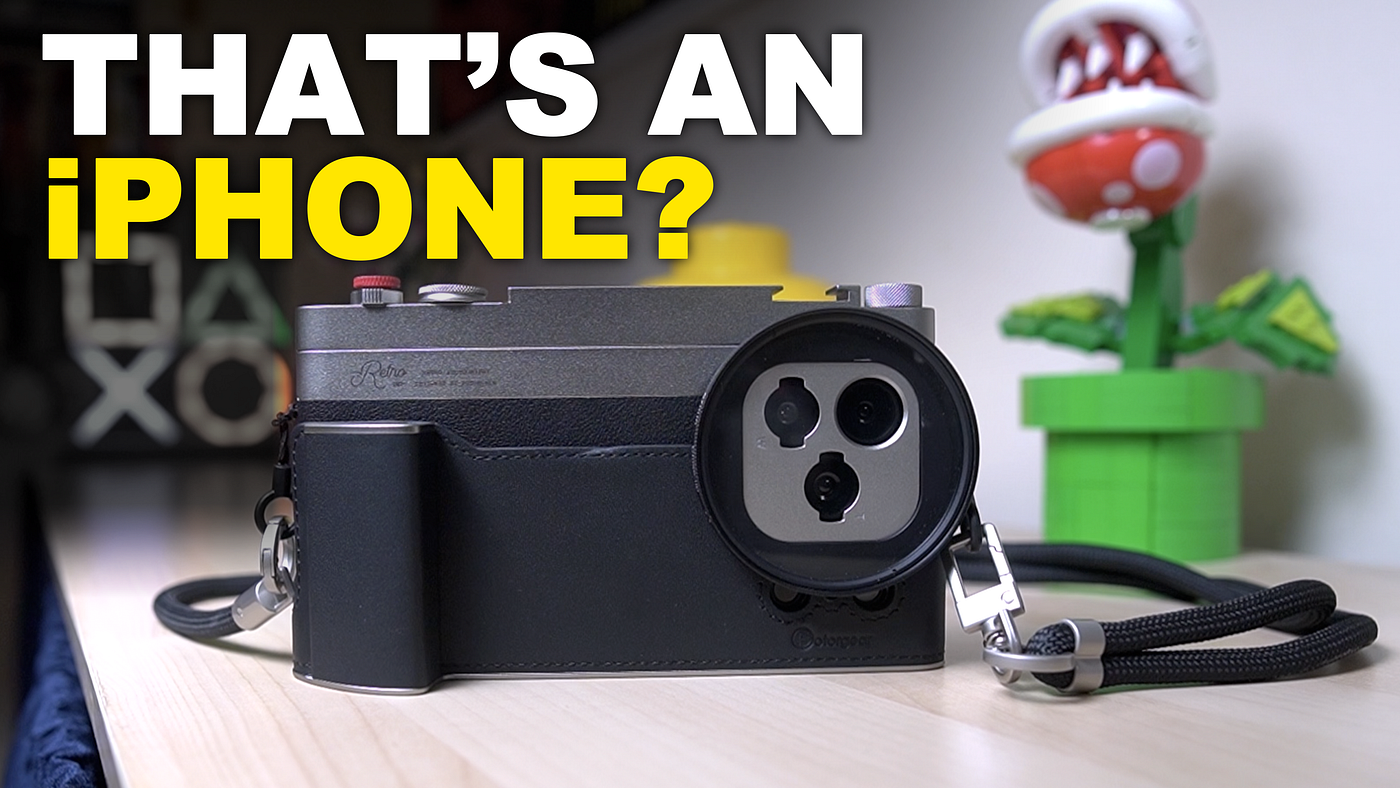
At first glance, it looks like a little retro camera.
There’s a textured grip, a silver top bar with physical controls, a neck strap and a circular filter adapter around the cameras. Turn it around, though, and there’s the screen of my iPhone 17 Pro.
That reveal captures much of the appeal of FotorGear’s Retro Photography Kit. It takes something familiar and makes you want to pick it up differently.
I’ve been exploring accessories that make an iPhone feel more like a dedicated camera. This is one of the most literal interpretations of that idea I’ve tried. But once the initial novelty wears off, what does it actually offer?
Disclosure: FotorGear supplied the Retro Photography Kit, 16mm wide-angle lens and MS02 wireless monitor for me to test and review.
The transformation starts before you take a photograph
My first impression was how carefully everything was presented.
The components have their own places in the packaging, and there’s another layer of accessories underneath the first tray. The attention extends to the strap, fittings and filter adapter. It feels like a complete kit.
The leather-like finish helps establish the vintage-camera character, but assembling it is where the transformation becomes convincing.
You remove the case’s side rails, fit the phone and put it back together. At that stage, you could stop. The phone already has the retro appearance, with access to its buttons and somewhere to attach the filter adapter.
Adding the Retro Bar brings the physical controls. The grip and strap take the idea further.
There is some figuring out involved. I found the strap attachment fiddly and revisited how the grip fitted and locked into position. Once fitted, it felt secure in my hands.
What struck me most was the finished appearance. Hanging from a neck strap, viewed from the back, it could easily pass for a small camera.
And yes, I enjoyed that.
The novelty is part of the appeal
“Novelty” can sound dismissive, but it describes a real part of why this kit interests me.
Holding a phone is such an ordinary action that I barely think about it. Giving that phone a grip, a shutter button and a strap changes the interaction.
The buttons feel tactile and clicky. The grip gives my hand somewhere to sit. The texture makes the whole thing feel more camera-like.
For someone whose phone is their only camera, I can see why that would be appealing. You’re giving the device you already own a different physical experience.
Still, nice buttons only take the argument so far. I wanted to see what happened when they were connected.
The app gives the controls a purpose
Using the Retro Bar with FotorGear’s camera app was the part that added substance to the experience.
I paired the bar through the app’s device settings and completed an available update. Within the settings, I could configure the controls around my preferences, including the shutter button, dial and two knobs.
I found the setup intuitive, and I appreciated the additional manual settings available in the app.
Then I started using the controls: pressing the shutter, changing the zoom and adjusting exposure.
Making those adjustments with physical controls on an iPhone felt slightly strange at first — in a good way. I could hold the grip and operate the camera in a way I enjoyed.
That matters more to me than the appearance alone. The kit gives the retro styling a practical role in how I take a photograph.
It doesn’t establish better image quality. But the experience of operating a camera is part of why people enjoy photography, and this kit changes that experience.
Every addition has a cost in convenience
The trade-off is visible: the more I attach, the bigger my phone becomes.
There are more parts to fit, carry and think about. I also wouldn’t choose this primarily for drop protection, although that is my impression of the design rather than something I’ve tested.
Fortunately, the kit gives you choices.
You can use the case on its own, add the Retro Bar or build the complete setup. There’s also a separate cold shoe fitting, providing another mounting option when the bar isn’t attached.
Personally, I see this mainly as a photography accessory. Other creators may want to add a microphone or light for video, but that isn’t what draws me to it.
My question is how much I would realistically keep attached.
The 16mm lens pushes that question further
FotorGear also supplied its 16mm wide-angle lens.
The presentation continues the same theme, with a small carry case and cleaning cloth. The lens made a positive first impression in my hands and fits the kit’s aesthetic.
It twists into the mount on the case, and the initial fit felt secure. There’s also a clip included, so the lens can be used without buying the complete retro kit.
In my initial comparison, I could see the wider field of view. I also found myself needing to select the specific iPhone camera underneath the attachment to see what the lens was doing.
That adds another step.
The comparison wasn’t enough to establish whether I’d choose the external lens over the iPhone’s built-in ultrawide, or whether it offered better image quality. Those are separate questions from whether it fits nicely and widens the view.
For me, the extra bulk brings the convenience issue back into focus. One of the reasons I use my phone for photographs is that it’s simple to carry and use. The more equipment I add, the more deliberately I have to choose to bring it.
The filter adapter is closer to what I’d use
The included 67mm filter adapter appeals to me more.
The adapter attaches magnetically to the case, while the filter screws into the adapter. In my demonstration, I fitted a close-up filter I already use with my camera.
That threaded connection felt secure, and being able to reuse an existing accessory gives the kit a practical benefit beyond its appearance.
This was an initial fitting demonstration, rather than a full assessment of the filter’s optical effect. But the compatibility itself is useful.
Of the configurations I explored, the case and filter adapter feel like a more realistic option for my own use. They let me add something to the phone while retaining more of its simplicity.
The monitor solves a different problem
The MS02 wireless phone monitor FotorGear sent serves a separate purpose.
When I film myself using the rear cameras, I want to see how I’m framed. As someone who makes content on my own, I understand the appeal immediately.
The monitor attaches magnetically to the back of the phone, and an adhesive magnetic ring is included as another mounting option.
During the initial fitting, I noticed that the screen extended below my phone. That made placing the attached setup down on a desk awkward. Holding it for a selfie, the overhang seemed less relevant.
My first impressions here concern the mounting and physical fit. They don’t establish how responsive or reliable the live view is. That needs its own working test.
Would I choose it over my camera?
If my dedicated camera and the FotorGear-equipped iPhone were both in front of me, and I was going out specifically to take photographs, I’d still choose my camera.
I prefer that shooting experience.
But I already own one. Someone who uses an iPhone for all their photography may see this kit differently.
The presentation and initial quality make the price feel reasonable to me. Whether it represents good value for someone else depends on how much they want the physical experience — and which parts they would actually use.
FotorGear has made my iPhone feel more like a camera. The appearance drew me in, and the app-connected controls gave me something to enjoy beyond the first impression.
There are compromises in size and convenience. I don’t see it replacing my dedicated camera.
But I do see the appeal of picking up a familiar device, wrapping my hand around a grip and taking a photograph with a physical shutter button.
Sometimes, changing how a camera feels is enough to make it interesting again.
Watch the full review: Can FotorGear Make My iPhone Feel Like a Real Camera?
Products featured: Retro Photography Kit · 16mm Wide-Angle Lens · MS02 Phone Monitor
Would you use a kit like this to change the experience of shooting with your phone, or would you rather keep your phone photography as simple as possible?